(18) 443-98-51 sp16ns@edu.nowysacz.pl
  • Facebook
  • Facebook
  • Poczta
  • CDiAP
Szkoła Podstawowa nr 16 z Oddziałami Integracyjnymi
  • Start
  • Aktualności
  • O szkole
    • Nasza kadra
    • Nasz patron
    • Nasz Hymn
    • ORŁY ZSPG nr 2
      • ORŁY 2016
    • Udział uczniów w konkursach
  • Projekty
    • Rekrutacja uzupełniająca do projektu „Zwiększenie jakości edukacji włączającejw sądeckich szkołach”
    • Zwiększenie jakości edukacji włączającej w sądeckich szkołach
    • Podróże z klasą
    • Laboratoria Przyszłości
    • Drzewo Świętego Franciszka
      • Galeria projektu
    • Małopolskie Talenty – Szkoła Podstawowa – Powiat Nowy Sącz
    • Podniesienie kompetencji kluczowych uczniów i nauczycieli szkół podstawowych i gimnazjalnych z terenu Nowego Sącza
    • Modernizacja kształcenia zawodowego w Małopolsce II
    • Od Pitagorasa do sztucznej inteligencji
    • Bezpieczna i przyjazna szkoła – nasz wspólny cel
    • Projekty unijne
    • Kabecjanie dają radę
    • E-Twinning
  • Do pobrania
    • Dokumenty szkolne
    • Materiały dla uczniów
    • Konkursy
    • Wykaz podręczników
    • Nowe programy
    • Programy nauczania
    • Wymagania edukacyjne
    • Dostosowania wymagań edukacyjnych do indywidualnych potrzeb i możliwości psychofizycznych uczniów.
    • Rekrutacja
    • Przetargi / kasacje
    • Dokumenty księgowe
  • Rekrutacja
    • Rekrutacja
    • Rekrutacja do szkół średnich
    • Centralna Komisja Egzaminacyjna
    • OKE Kraków
  • Nasze strony
    • Platforma Edukacyjna
    • Strona na Facebooku
    • BIP ZSPG2
    • Klub Europejski
    • Liga Ochrony Przyrody
      • LOP – PROJEKTY
  • Media
    • Zielona szkoła
  • Kontakt
Wybierz Stronę
Wyniki międzyszkolnego konkursu plastyczno – literackiego „LITERACKA HULAJNOGA” 2017

Wyniki międzyszkolnego konkursu plastyczno – literackiego „LITERACKA HULAJNOGA” 2017

przez Sławomir Oleksy | kwi 28, 2017 | Bez kategorii

Kategoria wiekowa – przedszkola: I miejsce: Magdalena Sromek l.7 Miejskie Przedszkole nr 20 w Nowym Sączu II miejsce: Zuzanna Kałużny kl. „0” Świetlica Środowiskowa „Piątkowa” III miejsce: Adam Pacholarz l.6 kl. „0” Miejskie Przedszkole nr 4 z Oddział. Integr. w...
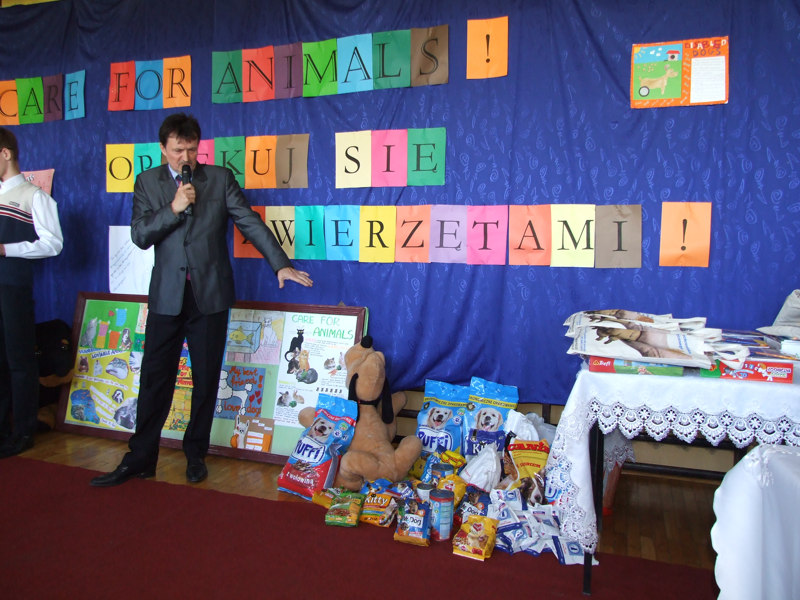
Podsumowanie III edycji międzyszkolnego konkursu ‘Care for animals’.

Podsumowanie III edycji międzyszkolnego konkursu ‘Care for animals’.

przez Sławomir Oleksy | maj 13, 2014 | Bez kategorii

Dnia 13 maja 2014 r. o godz. 9:30 w naszej szkole odbył się apel podsumowujący III edycję międzyszkolnego konkursu ‘Care for animals’.   Nagrody i wyróżnienia zostały wręczone przez dyrektora ZSPG nr 2 pana Janusza Chruślickiego oraz panią Agnieszkę Szłapkę,...
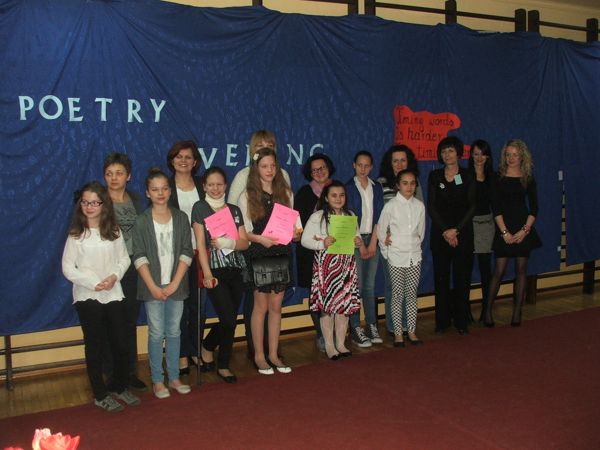
Wyniki III edycji szkolnego konkursu poetyckiego ‘Poetry Evening’

Wyniki III edycji szkolnego konkursu poetyckiego ‘Poetry Evening’

przez Sławomir Oleksy | mar 24, 2014 | Bez kategorii

Timing words is harder than timing tigers Z ogromną przyjemnością ogłaszamy wyniki III edycji szkolnego konkursu poetyckiego  ‘Poetry Evening’ I miejsce – Karolina Wolska, kl. Va II miejsce- Weronika Apanasewicz, kl. VIa III miejsce- Aleksandra Ogórek, kl. Va...
Nowsze Wpisy »

Kategorie

  • Aktualności
  • Bez kategorii
  • blogs
  • Galerie
  • news
  • Sport
  • Ważne
  • Wycieczki

Archiwa

  • marzec 2026
  • luty 2026
  • styczeń 2026
  • grudzień 2025
  • listopad 2025
  • październik 2025
  • wrzesień 2025
  • sierpień 2025
  • lipiec 2025
  • czerwiec 2025
  • maj 2025
  • kwiecień 2025
  • marzec 2025
  • luty 2025
  • styczeń 2025
  • grudzień 2024
  • listopad 2024
  • październik 2024
  • wrzesień 2024
  • sierpień 2024
  • lipiec 2024
  • czerwiec 2024
  • maj 2024
  • kwiecień 2024
  • marzec 2024
  • luty 2024
  • styczeń 2024
  • grudzień 2023
  • listopad 2023
  • październik 2023
  • wrzesień 2023
  • sierpień 2023
  • lipiec 2023
  • czerwiec 2023
  • maj 2023
  • kwiecień 2023
  • marzec 2023
  • luty 2023
  • styczeń 2023
  • grudzień 2022
  • listopad 2022
  • październik 2022
  • wrzesień 2022
  • sierpień 2022
  • czerwiec 2022
  • maj 2022
  • kwiecień 2022
  • marzec 2022
  • luty 2022
  • styczeń 2022
  • grudzień 2021
  • listopad 2021
  • październik 2021
  • wrzesień 2021
  • sierpień 2021
  • lipiec 2021
  • czerwiec 2021
  • maj 2021
  • kwiecień 2021
  • marzec 2021
  • styczeń 2021
  • grudzień 2020
  • listopad 2020
  • październik 2020
  • wrzesień 2020
  • sierpień 2020
  • lipiec 2020
  • czerwiec 2020
  • maj 2020
  • kwiecień 2020
  • marzec 2020
  • luty 2020
  • styczeń 2020
  • grudzień 2019
  • listopad 2019
  • wrzesień 2019
  • sierpień 2019
  • czerwiec 2019
  • maj 2019
  • kwiecień 2019
  • marzec 2019
  • styczeń 2019
  • listopad 2018
  • październik 2018
  • wrzesień 2018
  • sierpień 2018
  • czerwiec 2018
  • maj 2018
  • kwiecień 2018
  • marzec 2018
  • luty 2018
  • listopad 2017
  • październik 2017
  • wrzesień 2017
  • sierpień 2017
  • lipiec 2017
  • czerwiec 2017
  • maj 2017
  • kwiecień 2017
  • marzec 2017
  • luty 2017
  • styczeń 2017
  • grudzień 2016
  • listopad 2016
  • październik 2016
  • sierpień 2016
  • czerwiec 2016
  • maj 2016
  • kwiecień 2016
  • marzec 2016
  • luty 2016
  • styczeń 2016
  • grudzień 2015
  • listopad 2015
  • październik 2015
  • wrzesień 2015
  • sierpień 2015
  • lipiec 2015
  • czerwiec 2015
  • maj 2015
  • kwiecień 2015
  • marzec 2015
  • luty 2015
  • styczeń 2015
  • grudzień 2014
  • listopad 2014
  • październik 2014
  • wrzesień 2014
  • lipiec 2014
  • czerwiec 2014
  • maj 2014
  • kwiecień 2014
  • marzec 2014
  • luty 2014
  • styczeń 2014
  • listopad 2013
  • październik 2013
  • wrzesień 2013
  • sierpień 2013

O SP16 w Nowym Sączu

  • O Szkole Podstawowej nr 16
  • Dokumenty szkolne
  • Kontakt
  • Klauzula informacyjna RODO
  • Deklaracja dostępności

Informacje kontaktowe:

ul. Tadeusza "Bora" Komorowskiego 7
33-300 Nowy Sącz
tel. (18) 443-98-51
email: sp16ns@edu.nowysacz.pl
Dostępność
Tryby dostępności
Tryb awaryjny epilepsji
Tłumi kolor i usuwa migotanie
Tryb ten umożliwia osobom cierpiącym na epilepsję bezpieczne korzystanie z serwisu poprzez wyeliminowanie ryzyka napadów padaczkowych wynikających z migających lub mrugających animacji oraz ryzykownych kombinacji kolorystycznych.
Tryb dla niedowidzących
Poprawia wygląd strony internetowej
Ten tryb dostosowuje stronę internetową do wygody użytkowników z wadami wzroku, takimi jak pogarszający się wzrok, widzenie tunelowe, zaćma, jaskra i inne.
Tryb niepełnosprawności poznawczej
Pomaga skupić się na określonej treści
Ten tryb zapewnia różne opcje wspomagające, aby pomóc użytkownikom z zaburzeniami poznawczymi, takimi jak dysleksja, autyzm, CVA i inne, w łatwiejszym skupieniu się na podstawowych elementach witryny.
Tryb przyjazny ADHD
Zmniejsza rozproszenie uwagi i poprawia koncentrację
Ten tryb pomaga użytkownikom z ADHD i zaburzeniami neurorozwojowymi w łatwiejszym czytaniu, przeglądaniu i skupianiu się na głównych elementach witryny, przy jednoczesnym znacznym ograniczeniu czynników rozpraszających.
Tryb ślepoty
Umożliwia korzystanie z witryny za pomocą czytnika ekranu
Ten tryb konfiguruje stronę internetową tak, aby była kompatybilna z czytnikami ekranu, takimi jak JAWS, NVDA, VoiceOver i TalkBack. Czytnik ekranu to oprogramowanie dla niewidomych użytkowników, które jest instalowane na komputerze i smartfonie, a strony internetowe muszą być z nim kompatybilne.
Słownik online
    Czytelne doświadczenie
    Skalowanie treści
    Domyślny
    Lupa tekstu
    Czytelna czcionka
    Przyjazny dla dysleksji
    Zaznacz tytuły
    Zaznacz łącza
    Rozmiar czcionki
    Domyślny
    Wysokość linii
    Domyślny
    Odstępy między literami
    Domyślny
    Wyrównane do lewej
    Wyrównane do środka
    Wyrównane do prawej
    Wizualnie przyjemne wrażenia
    Ciemny kontrast
    Lekki kontrast
    Monochromia
    Wysoki kontrast
    Wysokie nasycenie
    Niskie nasycenie
    Dostosuj kolory tekstu
    Dostosuj kolory tytułu
    Dostosuj kolory tła
    Łatwa orientacja
    Wycisz dźwięki
    Ukryj obrazy
    Ukryj Emoji
    Przewodnik czytania
    Zatrzymaj animacje
    Maska do czytania
    Podświetl kursor
    Wyróżnij ostrość
    Duży ciemny kursor
    Duży kursor świetlny
    Czytanie poznawcze
    Wirtualna klawiatura
    Klawisze nawigacyjne
    Nawigacja głosowa

    Szkoła Podstawowa nr 16 z Oddziałami Integracyjnymi

    Accessibility Statement

    • zspg2.pl
    • 29 marca 2026

    Compliance status

    We firmly believe that the internet should be available and accessible to anyone, and are committed to providing a website that is accessible to the widest possible audience, regardless of circumstance and ability.

    To fulfill this, we aim to adhere as strictly as possible to the World Wide Web Consortium’s (W3C) Web Content Accessibility Guidelines 2.1 (WCAG 2.1) at the AA level. These guidelines explain how to make web content accessible to people with a wide array of disabilities. Complying with those guidelines helps us ensure that the website is accessible to all people: blind people, people with motor impairments, visual impairment, cognitive disabilities, and more.

    This website utilizes various technologies that are meant to make it as accessible as possible at all times. We utilize an accessibility interface that allows persons with specific disabilities to adjust the website’s UI (user interface) and design it to their personal needs.

    Additionally, the website utilizes an AI-based application that runs in the background and optimizes its accessibility level constantly. This application remediates the website’s HTML, adapts Its functionality and behavior for screen-readers used by the blind users, and for keyboard functions used by individuals with motor impairments.

    If you’ve found a malfunction or have ideas for improvement, we’ll be happy to hear from you. You can reach out to the website’s operators by using the following email

    Screen-reader and keyboard navigation

    Our website implements the ARIA attributes (Accessible Rich Internet Applications) technique, alongside various different behavioral changes, to ensure blind users visiting with screen-readers are able to read, comprehend, and enjoy the website’s functions. As soon as a user with a screen-reader enters your site, they immediately receive a prompt to enter the Screen-Reader Profile so they can browse and operate your site effectively. Here’s how our website covers some of the most important screen-reader requirements, alongside console screenshots of code examples:

    1. Screen-reader optimization: we run a background process that learns the website’s components from top to bottom, to ensure ongoing compliance even when updating the website. In this process, we provide screen-readers with meaningful data using the ARIA set of attributes. For example, we provide accurate form labels; descriptions for actionable icons (social media icons, search icons, cart icons, etc.); validation guidance for form inputs; element roles such as buttons, menus, modal dialogues (popups), and others. Additionally, the background process scans all the website’s images and provides an accurate and meaningful image-object-recognition-based description as an ALT (alternate text) tag for images that are not described. It will also extract texts that are embedded within the image, using an OCR (optical character recognition) technology. To turn on screen-reader adjustments at any time, users need only to press the Alt+1 keyboard combination. Screen-reader users also get automatic announcements to turn the Screen-reader mode on as soon as they enter the website.

      These adjustments are compatible with all popular screen readers, including JAWS and NVDA.

    2. Keyboard navigation optimization: The background process also adjusts the website’s HTML, and adds various behaviors using JavaScript code to make the website operable by the keyboard. This includes the ability to navigate the website using the Tab and Shift+Tab keys, operate dropdowns with the arrow keys, close them with Esc, trigger buttons and links using the Enter key, navigate between radio and checkbox elements using the arrow keys, and fill them in with the Spacebar or Enter key.Additionally, keyboard users will find quick-navigation and content-skip menus, available at any time by clicking Alt+1, or as the first elements of the site while navigating with the keyboard. The background process also handles triggered popups by moving the keyboard focus towards them as soon as they appear, and not allow the focus drift outside it.

      Users can also use shortcuts such as “M” (menus), “H” (headings), “F” (forms), “B” (buttons), and “G” (graphics) to jump to specific elements.

    Disability profiles supported in our website

    • Epilepsy Safe Mode: this profile enables people with epilepsy to use the website safely by eliminating the risk of seizures that result from flashing or blinking animations and risky color combinations.
    • Visually Impaired Mode: this mode adjusts the website for the convenience of users with visual impairments such as Degrading Eyesight, Tunnel Vision, Cataract, Glaucoma, and others.
    • Cognitive Disability Mode: this mode provides different assistive options to help users with cognitive impairments such as Dyslexia, Autism, CVA, and others, to focus on the essential elements of the website more easily.
    • ADHD Friendly Mode: this mode helps users with ADHD and Neurodevelopmental disorders to read, browse, and focus on the main website elements more easily while significantly reducing distractions.
    • Blindness Mode: this mode configures the website to be compatible with screen-readers such as JAWS, NVDA, VoiceOver, and TalkBack. A screen-reader is software for blind users that is installed on a computer and smartphone, and websites must be compatible with it.
    • Keyboard Navigation Profile (Motor-Impaired): this profile enables motor-impaired persons to operate the website using the keyboard Tab, Shift+Tab, and the Enter keys. Users can also use shortcuts such as “M” (menus), “H” (headings), “F” (forms), “B” (buttons), and “G” (graphics) to jump to specific elements.

    Additional UI, design, and readability adjustments

    1. Font adjustments – users, can increase and decrease its size, change its family (type), adjust the spacing, alignment, line height, and more.
    2. Color adjustments – users can select various color contrast profiles such as light, dark, inverted, and monochrome. Additionally, users can swap color schemes of titles, texts, and backgrounds, with over seven different coloring options.
    3. Animations – person with epilepsy can stop all running animations with the click of a button. Animations controlled by the interface include videos, GIFs, and CSS flashing transitions.
    4. Content highlighting – users can choose to emphasize important elements such as links and titles. They can also choose to highlight focused or hovered elements only.
    5. Audio muting – users with hearing devices may experience headaches or other issues due to automatic audio playing. This option lets users mute the entire website instantly.
    6. Cognitive disorders – we utilize a search engine that is linked to Wikipedia and Wiktionary, allowing people with cognitive disorders to decipher meanings of phrases, initials, slang, and others.
    7. Additional functions – we provide users the option to change cursor color and size, use a printing mode, enable a virtual keyboard, and many other functions.

    Browser and assistive technology compatibility

    We aim to support the widest array of browsers and assistive technologies as possible, so our users can choose the best fitting tools for them, with as few limitations as possible. Therefore, we have worked very hard to be able to support all major systems that comprise over 95% of the user market share including Google Chrome, Mozilla Firefox, Apple Safari, Opera and Microsoft Edge, JAWS and NVDA (screen readers).

    Notes, comments, and feedback

    Despite our very best efforts to allow anybody to adjust the website to their needs. There may still be pages or sections that are not fully accessible, are in the process of becoming accessible, or are lacking an adequate technological solution to make them accessible. Still, we are continually improving our accessibility, adding, updating and improving its options and features, and developing and adopting new technologies. All this is meant to reach the optimal level of accessibility, following technological advancements. For any assistance, please reach out to